
What Sticker Maker For WA
VideogogoPersonalization
4.6145.00 Reviews
- Version
- 1.6.0
- Installs
- 10.00M
- Age Rating
- Mature 17+
Screenshots
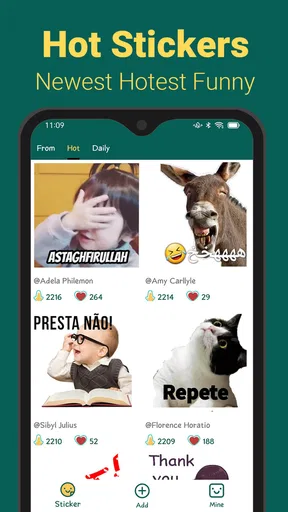
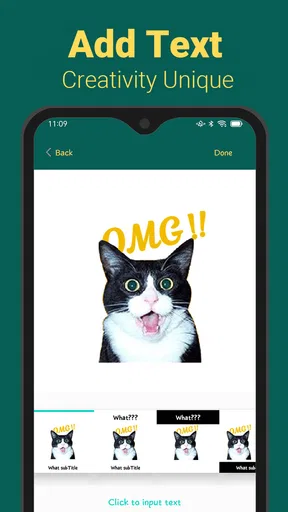
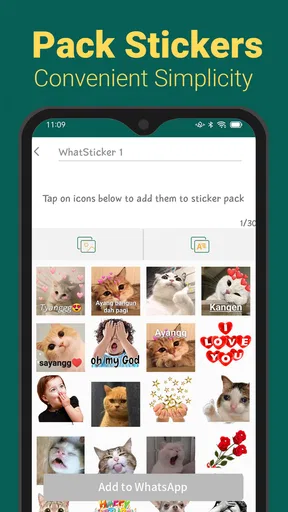
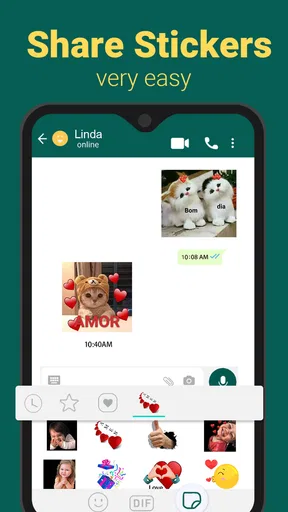
Our Review of What Sticker Maker For WA
 Analysis by Appyee
What Sticker Maker For WA is the kind of personalization app that makes an immediate impression because it turns an ordinary WhatsApp conversation into something more expressive. I found the basic idea easy to understand: use text-focused stickers to react, joke, emphasize a point, or add a little personality without typing another full sentence. It is free, aimed at mature users, and developed by Videogogo. After spending time with it, my view is that its strongest appeal arrives quickly, while its lasting value depends on whether you regularly use stickers rather than simply enjoy browsing them once.
The app belongs to a crowded part of the Android market, but it has a clear angle. Instead of treating stickers only as pictures or character reactions, it focuses on words and short messages that can work like visual one-liners. That makes it especially useful when a normal emoji feels too weak and a custom image feels like too much effort. I would describe it as a shortcut to a more playful WhatsApp style, not as a complete replacement for every sticker tool.
What the first week feels like
During the first few days, the attraction is straightforward. I could imagine opening it before a busy group chat, looking for a quick response, and finding something that communicates a mood faster than composing a message. A text sticker can be useful when the conversation has a joking tone, when someone sends an exaggerated claim, or when a simple “exactly” needs more energy. That immediate usefulness is the reason the app can feel more valuable than its simple concept suggests.
The store presents it as a sticker maker, while its practical appeal is broader: it gives you a collection of ready-to-use text expressions for WhatsApp. That distinction matters. People expecting a full image-editing studio may find the experience more limited than the word “maker” implies. People who mainly want quick additions for chats are more likely to understand its purpose and enjoy it.
I also like the low commitment. There is no purchase price to weigh up, and the app supports Android devices starting with version 7.0. That makes it accessible to people using older phones, although the experience will naturally depend on the phone and WhatsApp setup. The current release is version 1.6.0, so I would still treat it as a focused utility rather than a large creative platform with endless tools to learn.
A realistic everyday use case is a family group where someone posts a dramatic update. Instead of replying with a plain laughing emoji, I might choose a short text sticker that matches the joke. In a work-adjacent chat, I could use a polite reaction to acknowledge a message without adding unnecessary discussion. In a close-friends conversation, the same type of sticker can act almost like an inside joke. These small moments are where the app makes sense: not as an event, but as a faster way to give a familiar response some character.
The first-week novelty also comes from discovering which expressions actually fit your conversations. I would not save everything. My advice is to notice the phrases you repeatedly search for in chat and keep only the ones that feel natural. A smaller personal selection is easier to use than a large collection that turns every reply into a browsing session.
Why text stickers can be more useful than image packs
Text-based stickers occupy an interesting middle ground. Emojis are quick but often vague. GIFs can be expressive but may feel excessive, especially in a conversation that moves quickly. Image stickers can communicate a reaction, yet their meaning may depend on the character or picture. A short phrase is more direct. It can still be funny or dramatic, but the message is usually understood immediately.
That clarity is also a limitation. A picture can work across many situations because the viewer interprets it freely, while a written phrase is more specific. If the wording does not match the conversation, the sticker feels awkward rather than charming. I found that the best use is selective: choose text when the exact wording adds something, and use a normal emoji when the feeling is simpler.
This is one of the app’s less obvious trade-offs. It is not automatically more expressive than the usual alternatives. It is more precise in the right moment and more restrictive in the wrong one. Users who enjoy wordplay, short reactions, and playful chat language will probably get more from it than people who prefer visual memes or animated reactions.
How I would organize it for regular use
My practical approach would be to test the app during several normal conversations instead of judging it from a single browsing session. When a sticker feels genuinely useful, I would remember that style and look for similar expressions later. I would avoid adding every amusing option immediately, because a bloated sticker area creates friction when you are trying to respond quickly.
Another useful habit is matching the sticker to the relationship. A phrase that works with close friends may sound too casual in a family group or inappropriate in a more formal conversation. Since the app is rated for mature users, I would be particularly careful about using its more adult-oriented expressions around mixed-age chats or professional contacts. The age rating is not a reason to avoid the app, but it is a reminder to choose content with context in mind.
This is where the first-week appeal can either become a habit or disappear. If you treat the collection as a personal response kit, it has a purpose. If you simply scroll through it looking for entertainment, the novelty is likely to fade once the initial options feel familiar.
Value after the novelty wears off
After the first month, the important question is not how many stickers are available but how often they save time or improve a conversation. The app has a better chance of remaining installed for people who use WhatsApp heavily and communicate in several active groups. Frequent chat users encounter enough repeated situations—agreement, disbelief, celebration, teasing, apology, surprise—that a good text sticker can become a dependable shortcut.
For occasional WhatsApp users, the value is less certain. If you send only a few messages each day, opening a separate app to find a sticker may take longer than writing the response yourself. That does not make the app poor; it simply means the convenience depends on message volume and personal communication style.
The strongest long-term use case is recurring social language. Every group develops its own rhythm, and certain reactions appear again and again. A text sticker can become useful when it fits that rhythm without needing explanation. I would keep an eye out for phrases that function as reusable conversation tools rather than one-off jokes. Those are the stickers that justify keeping the app available.
There is also a value in reducing decision fatigue, but only if the collection stays manageable. When I already know that I want a quick “well done,” “no way,” or playful refusal, a sticker can be faster than searching for a GIF. However, if I have to inspect a long series of nearly identical choices, the advantage disappears. The app works best as a source of familiar shortcuts, not as an endless catalog to browse every time.
Who is most likely to keep using it
I think it is a good fit for people who enjoy expressive WhatsApp conversations, participate in lively group chats, and prefer written humor over reaction images. It can also suit users who want to add personality without learning a complicated editor. Someone who likes changing their chat style occasionally may find enough recurring value in a focused set of text stickers.
I would be more cautious if your main goal is to create highly personal artwork. A dedicated sticker-design application is likely to be better when you want precise control over images, typography, cropping, or a consistent visual identity. Likewise, if you primarily use animated stickers, GIFs, or illustrated characters, this app’s text-centered approach may feel narrow.
It is also not the best choice for someone who dislikes browsing separate collections or who wants every sticker to be completely original. The appeal here is convenience and ready-made expression. That saves time, but it also means your communication may sometimes resemble what other users are sending. The trade-off is familiar: speed and accessibility versus individuality.
How it compares with ordinary WhatsApp reactions
WhatsApp’s built-in emoji and reaction options remain the fastest solution for simple communication. They require no extra browsing and are less likely to interrupt the flow of a chat. I would use them for routine acknowledgment, quick approval, or a neutral emotional response.
What Sticker Maker For WA becomes more useful when the response needs a little wording. A text sticker can carry tone more clearly than a single symbol, especially when the humor depends on a phrase. Compared with GIF apps, it is usually a lighter form of expression: less visual, less dramatic, and potentially quicker once you know your preferred choices. Compared with a full custom sticker editor, it is more convenient but less creatively flexible.
That comparison helped me place the app correctly. It is not trying to replace every method of reacting in WhatsApp. It fills the gap between a basic emoji and a custom-made visual message. If that gap appears often in your conversations, the app earns its place. If it rarely appears, the built-in tools may be enough.
Maintenance, friction, and reasons it may fade
The maintenance burden is not technical complexity so much as collection management. Any sticker app becomes less pleasant when the choices stop feeling relevant. If you add items impulsively, you may later spend more time searching than reacting. I would periodically remove or ignore expressions that no longer match my conversations and keep a compact group for the people I message most.
Another source of friction is context switching. The moment you leave WhatsApp to find a sticker, the conversation can move on. This matters in fast group chats, where a delayed reaction may feel less natural. The app is therefore more effective when you already have a rough idea of what you want. Opening it with no plan and browsing through everything is the slowest possible workflow.
There is also the question of repetition. Text stickers depend heavily on wording, so repeated use can make them feel predictable faster than a varied image collection. A phrase that was funny during the first week may become stale after appearing in every group. I would treat the collection as seasonal in spirit: keep the expressions that still sound like you and let the rest lose priority.
The mature age classification deserves practical attention. I would not assume every item is suitable for children, mixed-age family groups, or workplace conversations. Before sharing a sticker, I would read the wording rather than relying on its visual appearance. This is a small habit, but it prevents the kind of awkward message that can happen when a playful pack is used without checking its tone.
Because the app is free, the decision to keep it installed is mostly about space, relevance, and convenience rather than financial commitment. That lowers the risk of trying it, but free access does not automatically create lasting value. I would keep it only if I noticed myself using its stickers naturally. If I repeatedly opened it, browsed, and returned to emojis instead, that would be a clear sign that it was not earning attention.
Three practical ways to get more from it
Build around situations, not categories. Instead of collecting every funny phrase, look for a small response set for agreement, surprise, encouragement, teasing, and polite refusal. This makes the collection useful in real conversations rather than impressive only while browsing.
Test stickers in low-risk chats first. A phrase that sounds harmless in a friends’ group may be too blunt in a family or professional conversation. Trying it where the tone is familiar helps you learn which expressions are genuinely versatile.
Use the app as a supplement, not a default keyboard replacement. Keep ordinary emojis and typed replies available. The best sticker is the one that adds tone without making a simple message feel overproduced.
These habits address the main weakness I noticed: the app can encourage collecting for its own sake. A disciplined selection turns it into a useful communication tool, while an oversized selection turns it into another place to scroll. The difference is not a hidden setting; it comes from how deliberately you use the available text.
My long-term verdict
What Sticker Maker For WA earns a trial from anyone who wants more expressive text reactions in WhatsApp without paying for a personalization tool. Videogogo has kept the concept focused, and the app’s broad reach is reflected in its average rating of 4.6 from around 43 thousand ratings, alongside over 10 million installs. Those figures suggest that the idea has connected with a substantial audience, but my recommendation still depends on how you chat.
For me, its lasting value comes from a small, carefully chosen set of phrases that I can recognize quickly. It is not the number of options that matters; it is whether the right response appears when a conversation needs it. The app is at its best when it makes a familiar interaction warmer, funnier, or more precise without slowing me down.
I would skip it if I wanted a serious design workspace, highly individualized artwork, or a collection centered on animated and image-heavy reactions. I would also skip it if I rarely use WhatsApp or dislike the extra step of opening a separate sticker source. In those cases, built-in reactions or a more specialized editor would be a better match.
For everyone else, the sensible approach is to try it without overcommitting. Explore the text styles, keep only the expressions that fit your real conversations, and judge it after the initial excitement has passed. If it becomes a reliable shortcut in your recurring chats, it deserves a permanent place. If it turns into a folder of forgotten phrases, uninstalling it is the honest conclusion. That balance is why I see this free personalization app as useful, but situational rather than essential.
Verdict
Strengths of What Sticker Maker For WA
- Create custom WhatsApp sticker packs from your own photos.
- Simple editing tools make cropping and adding text easy.
- Supports stickers with transparent backgrounds.
- Lets you organize stickers into themed packs.
- Quick sharing makes finished packs easy to add to WhatsApp.
Limitations of What Sticker Maker For WA
- Some advanced editing features may require in-app purchases.
- Removing backgrounds can be inaccurate with complex images.
- Sticker packs may require a minimum number of stickers.
- Ads can interrupt the editing or pack-creation process.
- Compatibility may vary across WhatsApp versions and devices.
Similar Picks in This Category
View All
Microsoft SwiftKey AI Keyboard
SwiftKey4.3

Wallpapers
Google LLC4.1

Zedge™ Wallpapers & Ringtones
Zedge4.7

Yandex Browser with Alice AI
Direct Cursus Computer Systems Trading LLC4.3

Ringtone Maker:create ringtone
Big Bang Inc.4.7

Fonts Keyboard
Fonts Keyboard3.9
Frequently Asked Questions
What is Sticker Maker for WA and what can I create with it?
Sticker Maker for WA is an app for creating personalized sticker packs for WhatsApp. You can usually turn photos, saved images, memes, drawings, or other pictures into stickers by cropping them, removing backgrounds, adding text, and applying simple decorations. It is useful for making custom reactions, personal emojis, themed packs, and stickers featuring friends, pets, or favorite characters.
How do I make and add a sticker pack to WhatsApp?
After opening the app, you generally create a new pack, choose images from your gallery or camera, edit each image, and save the finished stickers. Most versions require a minimum number of stickers before the pack can be exported. Once the pack is complete, tap the option to add or export it to WhatsApp, then confirm the process. The stickers should appear in WhatsApp under the sticker panel.
Is Sticker Maker for WA free to download and use?
The app is commonly available as a free download, but the exact features depend on the version and platform. Free use may include advertisements, optional purchases, or restrictions on certain editing tools and templates. Before installing, check the store listing for current pricing, subscription details, and in-app purchase information, since availability and conditions can change between Android and iOS.
Does Sticker Maker for WA work on both Android and iPhone?
Sticker Maker apps are available for Android and, in many cases, iPhone, although the app name, developer, interface, and supported features may differ between platforms. WhatsApp integration can also work slightly differently depending on the operating system. Always download the version from the official Google Play Store or Apple App Store and review the compatibility requirements before installing.
Are my photos and personal images safe when using Sticker Maker for WA?
Before importing personal photos, review the app’s permissions and privacy policy. The application may request access to your photo library, camera, or storage so it can create stickers, but the way images are processed depends on the developer. Avoid uploading sensitive photographs or private information unless you understand how the app handles data. Also verify the developer and user reviews to avoid unofficial copies.
